写在 2022 年的 静态博客选择

调研

用了Hexo很久了,期间也有不少其它产品, 也试了试这些框架

对于我, 核心需求是markdown + code高亮 + tex + rss + 二进制分页+tags+category 支持, 操作期望是0代码, 可以简单yaml/toml配置,和复制配置的配置行为, 然后有个基本不错的theme

毕竟主要产出在markdown而不是搭建

本地方案是 obsidian/vscode/vim 就可以了

閱讀全文 »

TLDR: setuptools在2023的体验的确比不上新工具hatching

Step by Step

install build

1
pip install --upgrade build

基础使用

提供pyproject.toml文件, 包含build-system section

1
2
3
4
5
6
7
8
9
10
[build-system]
requires = ["setuptools"]
build-backend = "setuptools.build_meta"

[project]
name = "yourname-packagename"
version = "0.0.1"
dependencies = [
"requests",
]
閱讀全文 »

TS Cheat Sheet

为什么写这篇

antfu的题目 大多就是基础方法+递归, issues充斥着重复内容, 最开始还有点TS的味道, 后面完全变成了只有基础方法, 组合出一个东西, 感觉这个更适合作为递归练习题, 而不是TS练习题 (没有数值强行用数组拼接+length, 等等

TS有文档,是英文的,难以用中文检索

本篇呢,是cheatsheet,不是document,把实际会用到常用的一些列出来+一些场景描述

閱讀全文 »

带sudo的一定小心, 别选错盘了

工具推荐

bcompare

gparted

常用命令

io测试

https://linuxreviews.org/HOWTO_Test_Disk_I/O_Performance#Testing_random_4K_reads

大块读

1
fio --name TEST --eta-newline=5s --filename=temp.file --rw=read --size=2g --io_size=10g --blocksize=1024k --ioengine=libaio --fsync=10000 --iodepth=32 --direct=1 --numjobs=1 --runtime=60 --group_reporting

大块写

1
fio --name TEST --eta-newline=5s --filename=temp.file --rw=write --size=2g --io_size=10g --blocksize=1024k --ioengine=libaio --fsync=10000 --iodepth=32 --direct=1 --numjobs=1 --runtime=60 --group_reporting

随机4K读

1
fio --name TEST --eta-newline=5s --filename=temp.file --rw=randread --size=2g --io_size=10g --blocksize=4k --ioengine=libaio --fsync=1 --iodepth=1 --direct=1 --numjobs=32 --runtime=60 --group_reporting
閱讀全文 »

背景

众所周知, change detect要解决的事情,就是数据变化 触发 视图变化,而最常见的两个问题是如何探测变化,和如何减少不必要的更新

vue用修改getter/setter或proxy的方式 来完成依赖收集和变化通知,使用lazy watcher来减少更新

svelte 采用编译时更改代码的行为, 避免检测

react 采用setState函数调用 和 队列控制批量更新

那ng呢

NgZone

ng: 什么时候会有视图更新

  • 用户的操作事件: click/change/input
  • 去后台请求响应后
  • Timers:

zone.js 能够维持运行时上下文, zone有生命周期钩子, 且Monkey-patched了一些方法(setInterval,alert,prompt,addEventListener,removeEventListener)

NgZone, 提供 run(callback)/runOutsideAngular(callback), 分别用于当三方api中的异步回调想要修改内容时触发检查,和普通的操作中希望避开检查

你还可以设置 ChangeDetectionStrategy.OnPush, 手动触发更新检查

你也可以动态的通过ChangeDetectorRef进行检查的启用和停用

甚至你可以 通过 module 中 { ngZone : 'noop'} 去一定层级禁用它,然后自己实现响应式都可以

而react是把数据与视图绑定的叫做state,没绑定的叫做ref

总结一下

以渲染10000个可以draggle的svg作为例子, 通过cdr并不能完全避免检测,因为你的mouse move也会触发检测,只是没有变化发生而已

而通过在mouseDown中的runOutsideAngular中给mousemove绑定,就可以实现mouse move 也不触发检测, 再在mouseUp中移除监听,并且通过this.zone.run触发更新检测

而对于多个异步的调用过程,在zone的加持下也容易看到调用的“栈结构”

参考

youtube zone

https://github.com/angular/angular/tree/main/packages/zone.js

https://angular.io/guide/zone

https://angular.io/api/core/ChangeDetectionStrategy

https://angular.io/api/core/ChangeDetectorRef

问题

个人的网页需要一些书目数据,印象中,老的豆瓣直接是页面还是接口,能获直接取到,可以作为爬虫入门练手

然而前天一看,新版的豆瓣已经不明文返回数据了

https://search.douban.com/book/subject_search?search_text=%E5%AE%9E%E5%8F%98%E5%87%BD%E6%95%B0&cat=1001

预备知识

C++函数调用:这个知识点让你知道函数调用堆栈的常见设计

js调试:chrome断点,格式化代码,console,js基本语法,

思路

定位数据来源

一般来说 只要页面不用花里胡哨的技巧,比如把数据放在png里的话,一般来说,数据只会在Fetch/XHR,JS,htmlws

通过页面展示的实变函数论 去上述类型中搜索,结果没有任何内容中直接包含数据

閱讀全文 »

问题

一个支持 任意多参数,可以柯里化的加法函数

思路

直接返回函数 保留已传内容的加和

toString 支持输出值

实现

1
2
3
4
5
6
7
8
9
10
function add() {
const createF = (v) => {
const b = function () {
return createF(v + [...arguments].reduce((s, cur) => s + cur, 0));
};
b.toString = () => v;
return b;
};
return createF([...arguments].reduce((s, cur) => s + cur, 0));
}

使用

1
2
3
4
5
6
7
8
9
console.log(+add(1));
console.log(+add(1, 2));
console.log(+add(1, 2)(3));
console.log(+add(1, 2)(3)(4));
const x = add(5);
console.log(+x(6));
console.log(+x(7)(8));
const y = x(9)(9, 10);
console.log(+y());

问题

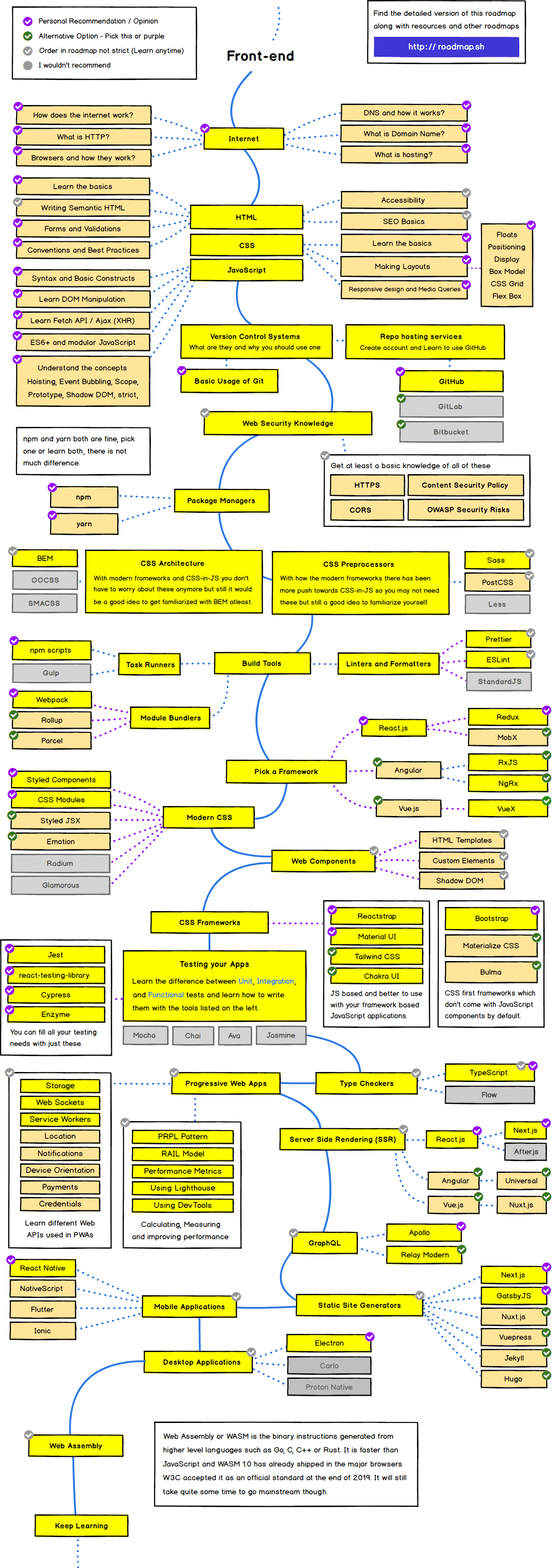
不论是面试也好,培训新人也好,自己总结也好,做个这些子集的超集。这里尽量给一手资料的链接,和一些公共维护的文档,也建议大家少看博客这类二手资料/非公共资料。

RoadMap

前端基础

HTML 与 语义化 HTML

css 与 css3

js

js mdn

基本开发技能

git

如何使用 google 搜索/《提问的智慧》

linux/wsl/常用 linux 命令

基本数据结构和算法(https://oi-wiki.org/ , codeforces.com 1900 分以下的题)

设计模式

前端包工具

npm/yarn , nvm

Webpack/Rollup/Parcel

Angular CLI/Nuxt/Next/Gatsby/CRA

Bazel

gulp/npm scripts

样式

sass/less/postcss

tailwind

Angular Material/Element UI/Ant Design

代码风格

Angular Styleguide/Vue Styleguide/Reactjs advanced guides

Angular Schematics

eslint/prettier/git hooks

三方基础

TypeScript

RxJs

状态管理

Flux/@ngrx/Angular Services/Vuex/Redux

PWA

@angular/pwa/Nuxt pwa/Workbox

Router

Vue router / Angular router / React router

非浏览器

Ionic/React Native/Electron

SSR

Flutter

WASM

Testing

单元:Jasmine/Karma/Jest

e2e:

Util

日期 dayjs/Momentsjs

轮播 swiper

图表 echarts

条形码 jsbarcode

二维码 qrcode

2021 frontend roadmap

常用知识

异步通信

callback

Promise

async/await

Observer

RxJs

问题

因为工期,项目上有多个长分支,而最近在看pr的时候,发现有些已经合并过的,在页面上还是展示了变更,但是命令行里 直接diff两个分支不存在

复现

https://github.com/CroMarmot/gitlab-pr-view-bug/blob/master/reproduce.sh

1
2
3
4
5
6
7
8
9
10
11
12
13
14
15
16
17
18
19
20
21
22
23
24
25
26
27
28
29
30
31
32
33
34
35
36
37
38
39
40
41
42
43
44
45
46
47
48
49
50
51
52
53
54
55
56
57
58
# Init Repo
cd /tmp
mkdir gitlab-pr-view-diff-bug && cd gitlab-pr-view-diff-bug
git init
echo "Init" >> init
git add init
git commit -m "init"

# branchs
git checkout -b pre-release
git checkout -b common
git checkout -b feat

# some feature on feat0 branch
echo "feat0" >> feat0
git add feat0
git commit -m "file feat0"

git checkout pre-release
git merge --no-ff --no-edit feat
sleep 1

# some common update
git checkout common
echo "cmm" >> cmm
git add cmm
git commit -m "file cmm"
sleep 1

git checkout pre-release
git merge --no-ff --no-edit common
sleep 1

# feat use common and update some feature
git checkout feat
git merge common --no-edit
sleep 1
echo "feat1" >> feat1
git add feat1
git commit -m "file feat1"
sleep 1

# diff
git log --all --graph --oneline
echo "git diff pre-release feat"
git diff pre-release feat

echo "git diff pre-release..feat"
git diff pre-release..feat

echo "git diff pre-release...feat"
git diff pre-release...feat

echo 'git diff $(git merge-base pre-release feat) feat'
git diff $(git merge-base pre-release feat) feat

# clear
rm -rf /tmp/gitlab-pr-view-diff-bug/

输出

1
2
3
4
5
6
7
8
9
10
11
12
13
14
15
16
17
18
19
20
21
22
23
24
25
26
27
28
29
30
31
32
33
34
35
36
37
38
39
40
41
42
43
44
45
46
47
48
49
50
51
52
53
54
55
56
57
58
59
60
61
62
63
64
65
66
67
68
69
70
71
72
73
74
75
76
77
78
79
80
81
82
83
84
85
86
87
88
89
90
91
92
93
Initialized empty Git repository in /tmp/gitlab-pr-view-diff-bug/.git/
[master (root-commit) 7dbccd5] init
1 file changed, 1 insertion(+)
create mode 100644 init
Switched to a new branch 'pre-release'
Switched to a new branch 'common'
Switched to a new branch 'feat'
[feat 5e8b20f] file feat0
1 file changed, 1 insertion(+)
create mode 100644 feat0
Switched to branch 'pre-release'
Merge made by the 'recursive' strategy.
feat0 | 1 +
1 file changed, 1 insertion(+)
create mode 100644 feat0
Switched to branch 'common'
[common 09a3969] file cmm
1 file changed, 1 insertion(+)
create mode 100644 cmm
Switched to branch 'pre-release'
Merge made by the 'recursive' strategy.
cmm | 1 +
1 file changed, 1 insertion(+)
create mode 100644 cmm
Switched to branch 'feat'
Merge made by the 'recursive' strategy.
cmm | 1 +
1 file changed, 1 insertion(+)
create mode 100644 cmm
[feat 9d8b809] file feat1
1 file changed, 1 insertion(+)
create mode 100644 feat1
* 9d8b809 (HEAD -> feat) file feat1
* b9bfda6 Merge branch 'common' into feat
|\
| | * 376c6cc (pre-release) Merge branch 'common' into pre-release
| | |\
| | |/
| |/|
| * | 09a3969 (common) file cmm
| | * 5a08d58 Merge branch 'feat' into pre-release
| |/|
| |/
|/|
* | 5e8b20f file feat0
|/
* 7dbccd5 (master) init
git diff pre-release feat
diff --git a/feat1 b/feat1
new file mode 100644
index 0000000..d7c678b
--- /dev/null
+++ b/feat1
@@ -0,0 +1 @@
+feat1
git diff pre-release..feat
diff --git a/feat1 b/feat1
new file mode 100644
index 0000000..d7c678b
--- /dev/null
+++ b/feat1
@@ -0,0 +1 @@
+feat1
git diff pre-release...feat
diff --git a/feat0 b/feat0
new file mode 100644
index 0000000..05884ff
--- /dev/null
+++ b/feat0
@@ -0,0 +1 @@
+feat0
diff --git a/feat1 b/feat1
new file mode 100644
index 0000000..d7c678b
--- /dev/null
+++ b/feat1
@@ -0,0 +1 @@
+feat1
git diff $(git merge-base pre-release feat) feat
diff --git a/feat0 b/feat0
new file mode 100644
index 0000000..05884ff
--- /dev/null
+++ b/feat0
@@ -0,0 +1 @@
+feat0
diff --git a/feat1 b/feat1
new file mode 100644
index 0000000..d7c678b
--- /dev/null
+++ b/feat1
@@ -0,0 +1 @@
+feat1

注意到 上面 4种比较方式,前两种一致,后两种一致,而对于看一个pr导致的变化,更期望的是前两种(仅多了 feat1)而不是后两种(多了 feat0 和 feat1)

**但实际上 直接的 diff 也不是真正期望看到的,期望的还是如果merge以后和当前的差异 **

解释

搜到了一个gitlab-ce官方讨论的地方,大概意思是用的git diff A...B相当于git diff $(git merge-base A B) B

也就是 当预发布分支 pre-release 合并了公共的一个分支 common 后, 功能分支feat 页合并过公共分支后

那么git merge-base A B 去找的并不是A

而 你所看到的 pr 并不是真正的变化,就离谱

在线

看起来 github 还有这个问题

https://github.com/CroMarmot/gitlab-pr-view-bug/pull/1/files

但 gitlab官方似乎已经改了

https://gitlab.com/YeXiaoRain/gitlab-pr-view-bug/-/merge_requests/1/diffs

参考

https://gitlab.com/gitlab-org/gitlab-foss/-/issues/15140

对于transition的一个核心问题是时间哪里来的

因为name这些感觉能拿到, 拼接也就当然

而 transition包裹的内部元素销毁,如果能拿到时间,那其实跟keep-alive 原理类似,在时间以后再销毁即可

然而我们并没有传递一个时间给元素,它却能知道时间

source code

vue2

src/platforms/web/runtime/transition-util.js

1
2
3
4
5
6
7
8
9
10
11
12
13
14
export function getTransitionInfo (el: Element, expectedType?: ?string): {
type: ?string;
propCount: number;
timeout: number;
hasTransform: boolean;
} {
const styles: any = window.getComputedStyle(el)
// JSDOM may return undefined for transition properties
const transitionDelays: Array<string> = (styles[transitionProp + 'Delay'] || '').split(', ')
const transitionDurations: Array<string> = (styles[transitionProp + 'Duration'] || '').split(', ')
const transitionTimeout: number = getTimeout(transitionDelays, transitionDurations)
const animationDelays: Array<string> = (styles[animationProp + 'Delay'] || '').split(', ')
const animationDurations: Array<string> = (styles[animationProp + 'Duration'] || '').split(', ')
const animationTimeout: number = getTimeout(animationDelays, animationDurations)

vue3

packages/runtime-dom/src/components/Transition.ts

1
2
3
4
5
6
7
8
9
10
11
12
13
export function getTransitionInfo(
el: Element,
expectedType?: TransitionProps['type']
): CSSTransitionInfo {
const styles: any = window.getComputedStyle(el)
// JSDOM may return undefined for transition properties
const getStyleProperties = (key: string) => (styles[key] || '').split(', ')
const transitionDelays = getStyleProperties(TRANSITION + 'Delay')
const transitionDurations = getStyleProperties(TRANSITION + 'Duration')
const transitionTimeout = getTimeout(transitionDelays, transitionDurations)
const animationDelays = getStyleProperties(ANIMATION + 'Delay')
const animationDurations = getStyleProperties(ANIMATION + 'Duration')
const animationTimeout = getTimeout(animationDelays, animationDurations)

所以

核心是window.getComputedStyle

0%